Your CGM gives you your glucose when you check it but it also gives you the following:
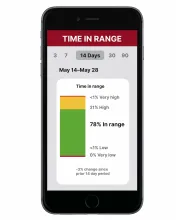
Time in range: Your time in range graph shows you how much time your glucose was in your target range. It also shows you the percentage of time you were above or below your target range.
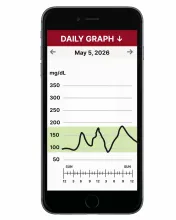
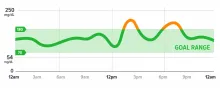
Daily graph: The daily graph helps you see if your glucose is in your target range and when your glucose levels went too high or too low. Most CGMs will allow you to personalize your target range.
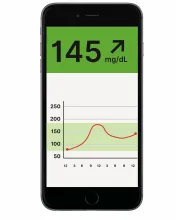
Trend arrows: Trend arrows can help you quickly see if your glucose is rising or dropping.
How to Use CGM Data to Identify Trends and Factors
Using your CGM to check your glucose regularly will allow you to notice how food, activity, stress, medication, and other factors play a part in how your glucose levels change. With this information, you can work with your healthcare team to make changes to your treatment plan, if needed.
Use the steps below to help you understand your glucose readings.
1. Review your daily graph.
A good way to see if you’re reaching your goals is to look at your daily graph. Here you can see if your glucose is within your target range and when your glucose levels go too high or too low.
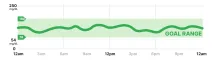
Here’s an example CGM graph staying within the target range of 70–180 mg/dL.
Here’s an example CGM graph of glucose peaking higher than your target range.